Floating timer · Mac, Windows, Linux

A task manager with an always-on-top timer

TriggerFlo is a Kanban board where every card has a timer, and starting one opens a floating window that stays above every other application. Four layouts — Small, Island, Compressed and Expanded. Mac, Windows and Linux, free up to 3 projects.

macOS 12+, Windows 10+, Linux. Pro $45.99/yr or $119 once.

The short answer

TriggerFlo is a task manager with an always-on-top floating timer. Press play on a card and a timer window opens above every other application, showing the task you are on; switching tasks takes one click. It comes in four layouts — Small, Island, Compressed and Expanded — chosen under Settings > Timer, and it runs natively on macOS, Windows and Linux.

The reason to want this is narrow and specific: people stop tracking time because the tracker ends up behind three other windows. A timer you cannot see is a timer you forget to stop.

Tasks and time in one window

Most always-on-top timers do not know what you are working on

Search for a floating timer and you get two kinds of answer. Time trackers with a mini-timer mode, which count hours against a project but have no task board behind them. And standalone Pomodoro overlays, which are a countdown and nothing else. Either way the question "what was I actually doing for those 90 minutes?" is answered somewhere else, by you, later.

In TriggerFlo the floating timer is the front end of the board. It is counting against a specific card, so the estimate, the subtasks, the due date and the tracked total all live on the same object. Nothing to reconcile at the end of the week.
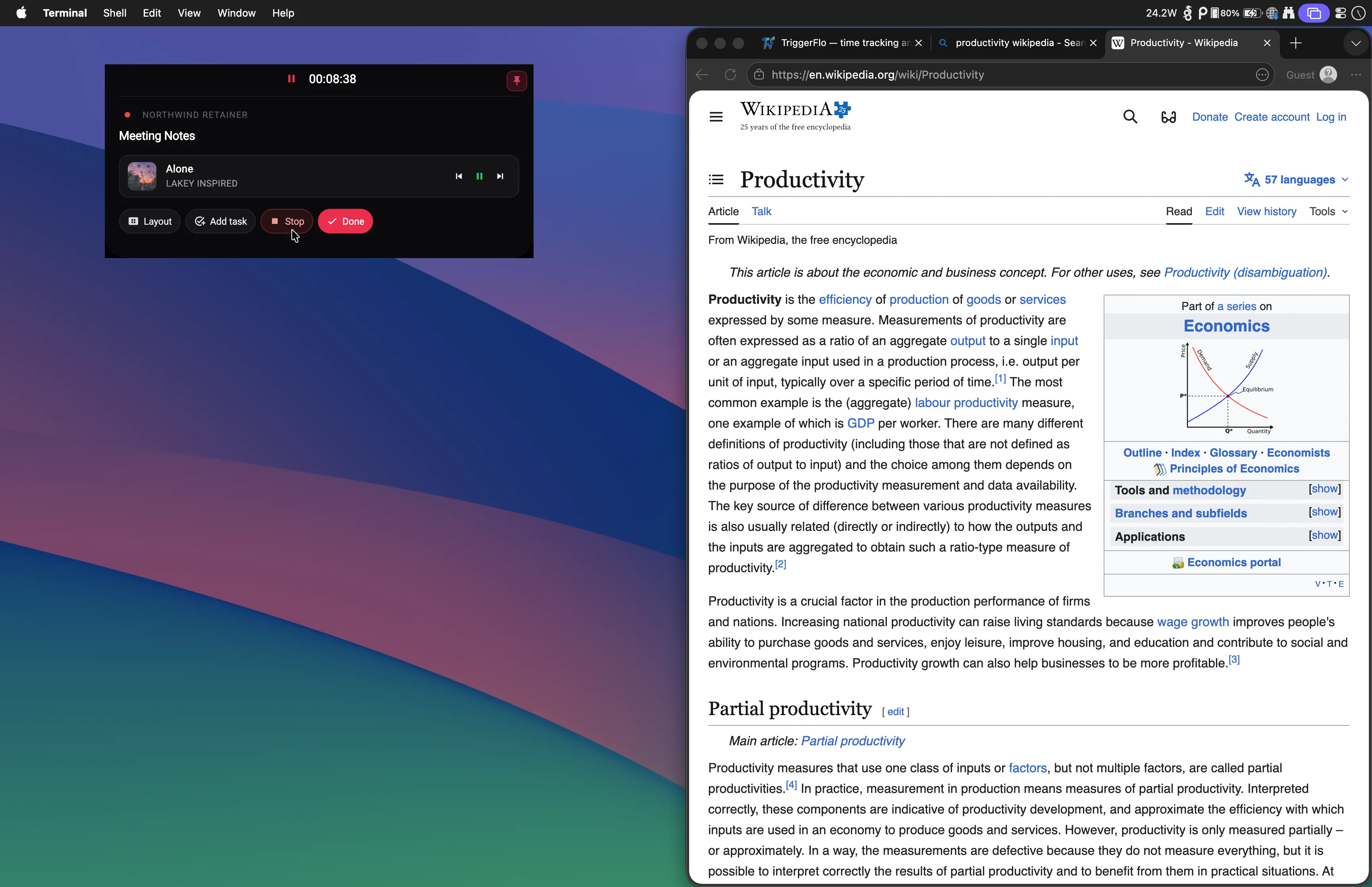
The TriggerFlo floating timer pinned above another application, showing the current task name and elapsed time.

Four floating timer layouts

All four stay above other windows. They differ in how much of the screen they are willing to take. Switch under Settings > Timer.

The timer also carries its own buttons — snooze to the next task, start a break, open notes and subtasks, mute the chime — and you can reorder or disable any of them under Settings > Timer. Corners can be rounded or square, and position memory reopens the window where you last put it.

How it behaves on each desktop

"Always on top" is a window-manager feature, not a CSS trick, so it is worth being precise about where it does and does not hold.

On iOS and Android there is no always-on-top window — the platforms do not allow one — so the timer lives in a home-screen widget and a persistent notification instead, with companion apps on Apple Watch and Wear OS.

The board behind the timer

A real task manager, not a timer with a task field

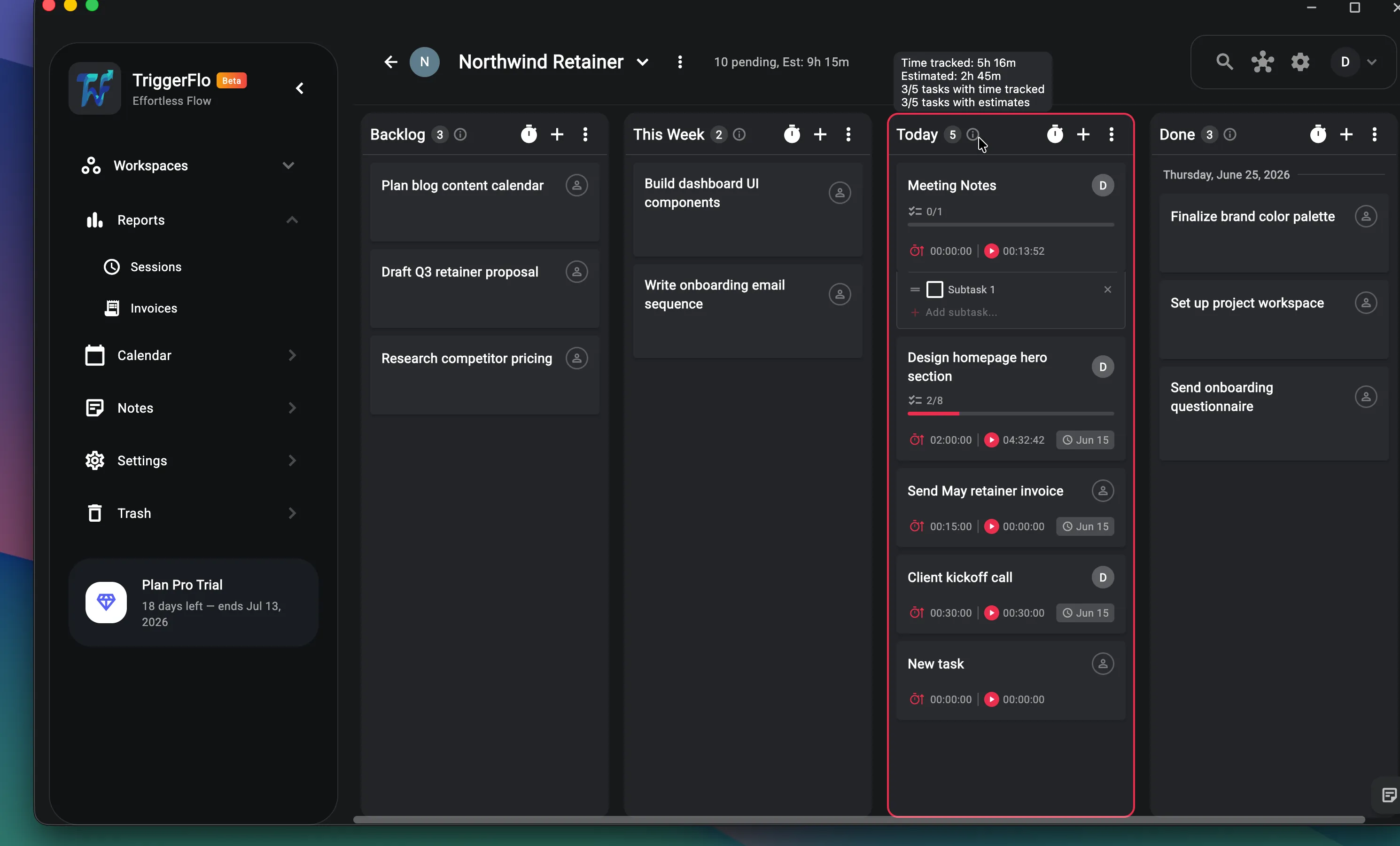
Kanban columns you define, subtasks, estimates against actuals, due dates, recurring tasks, tags, comments and attachments. Two-way Google Calendar sync. Time reports and invoicing when the tracked hours need to become a bill.

And nothing pointed at you: no screenshots, no activity scores, no idle detection reported to anybody. Why that is a deliberate choice →

A TriggerFlo Kanban board with cards showing estimates, tracked time, subtask progress and due dates.

Always-on-top timers — common questions

Is there a task manager with a timer that stays on top of other windows?

Yes — TriggerFlo. It is a Kanban task board where pressing play on a card opens a floating timer window that stays above every other application. Most tools make you choose: a time tracker with an always-on-top mini timer but no real task board, or a task manager with a timer buried in a tab. TriggerFlo is both in one native app, free for up to 3 projects.

How do I turn on the always-on-top timer in TriggerFlo?

It is on by default. Click the play button on any task card and the floating timer window appears, already pinned above other windows. There is no setting to enable — the setting under Settings > Timer chooses which of the four layouts it uses.

What are the four floating timer layouts?

Small is a compact floating window that snaps to a nine-position grid. Island is a pill docked at the top of the screen, in the style of the Dynamic Island. Compressed is a minimal bar with just the task, the elapsed time and a stop button. Expanded is a full sidebar docked left or right that also shows the task description, subtasks and notes. Switch between them under Settings > Timer.

Does the floating timer work on Windows?

Yes. On Windows 10 and 11 it is a genuine always-on-top window that stays above Teams, VS Code and the browser. Closing the main TriggerFlo window sends the app to the system tray instead of quitting, so the timer keeps running and you can start or stop from the tray menu.

Does the always-on-top timer work on Linux?

Under X11 and XWayland, yes — GTK maps always-on-top to the EWMH _NET_WM_STATE_ABOVE hint and Mutter honours it. Under a native Wayland session it does not: the compositor owns window stacking and a regular application cannot raise itself, so the call silently does nothing. Launching with GDK_BACKEND=x11 puts the app on XWayland in the same GNOME session and the timer pins correctly.

Can I see which task the timer is counting?

Yes. The floating timer shows the task it is tracking, not just a number, and switching to a different task takes one click without opening the main window. A progress border fills or depletes as time passes, and in count-down mode it shows remaining rather than elapsed time.

Is there a free always-on-top timer?

TriggerFlo is free forever for up to 3 projects, with no credit card, and the floating timer is not a paid feature. Pro is $45.99 a year or $119 once for a lifetime license.

Is TriggerFlo just a Pomodoro overlay?

No. If all you want is a countdown pinned over your screen, a small Pomodoro utility will do it with less setup, and one of those is the better pick. TriggerFlo is for the case where the timer needs to know what you are working on — the floating window is the front end of a Kanban board that carries estimates, subtasks, due dates and reports.

Put the timer where you can see it

Free up to 3 projects, no credit card. The floating timer is in the free tier.

Get release notes in your inbox

New features and fixes as they ship on desktop and mobile. No spam, unsubscribe any time.