Comparison · TriggerFlo vs Harvest
Harvest is a serious billing tool with twenty years behind it. TriggerFlo is a timer and a Kanban board in one native app, at a flat price with no usage meter — and a lifetime license if you would rather stop renting software.
Free forever up to 3 projects. Pro $45.99/yr, or $119 once. Mac, Windows, Linux, iOS, Android.
$108
Harvest Teams, one person, one year ($9/seat/mo, billed annually). TriggerFlo Pro is $45.99 — or $119 once, forever.
+ usage
Harvest Teams is priced “starting from”: extra invoices, projects, clients and tasks are billed on what you use. TriggerFlo Pro is flat.
$168
Harvest plus Forecast for one person for a year, if you want the scheduling half too. TriggerFlo has the board in the same app.
A long-established time tracker built around billing: track hours against a client project, turn them into an invoice, and get paid — with expense tracking and accounting integrations around it.
| Feature | TriggerFlo | Harvest |
|---|---|---|
| Price for one person, year one | Yes. $45.99/yr, or $119 once for lifetime | Partly. $108/yr on Teams ($9/seat/mo annual, $11 monthly) |
| Free plan | Yes. Free forever, up to 3 projects, unlimited tracking | Partly. Free forever, but 1 seat and 2 projects |
| One-time purchase option Pay once, own it | Yes. Lifetime license, $119 | No. Subscription only |
| The listed price is the whole price No metered extras on top of the seat fee | Yes. Flat. Unlimited projects, clients and invoices on Pro | No. Teams is priced "starting from" — additional invoices, projects, clients and tasks are billed on usage |
| Kanban board in the same app Tasks, columns, drag and drop | Yes. Board and timer are one product | No. Scheduling is Harvest Forecast, a separate $5/person/mo product |
| Estimate against actual on the card | Yes. Every card carries its estimate and its tracked time | Partly. Project budgets in Harvest; planned-vs-tracked needs Forecast connected |
| Invoices from tracked time | Yes. Included with Pro at $5.99/mo, PDF and CSV | Yes. The core of the product, and on the free plan too |
| Expense tracking with receipts | No. Not built | Yes. Included, free plan included |
| Accounting and payment integrations | Partly. REST API, Google Calendar, Spotify | Yes. Accounting and payment integrations on Teams |
| Always-on-top floating timer | Yes. Four layouts, stays above other windows | Partly. Desktop apps for macOS and Windows |
| Native Linux desktop app | Yes. .deb and .tar.gz, x86_64 and ARM64 | No. macOS and Windows only |
| Smartwatch app | Yes. Apple Watch and Wear OS | No. iPhone and Android apps; no watch app listed |
| Timesheet approvals and profitability reporting | No. Not built | Yes. On Enterprise, $14/seat/mo annually |
Price for one person, year one
Free plan
One-time purchase option
Pay once, own it
The listed price is the whole price
No metered extras on top of the seat fee
Kanban board in the same app
Tasks, columns, drag and drop
Estimate against actual on the card
Invoices from tracked time
Expense tracking with receipts
Accounting and payment integrations
Always-on-top floating timer
Native Linux desktop app
Smartwatch app
Timesheet approvals and profitability reporting
Difference 1
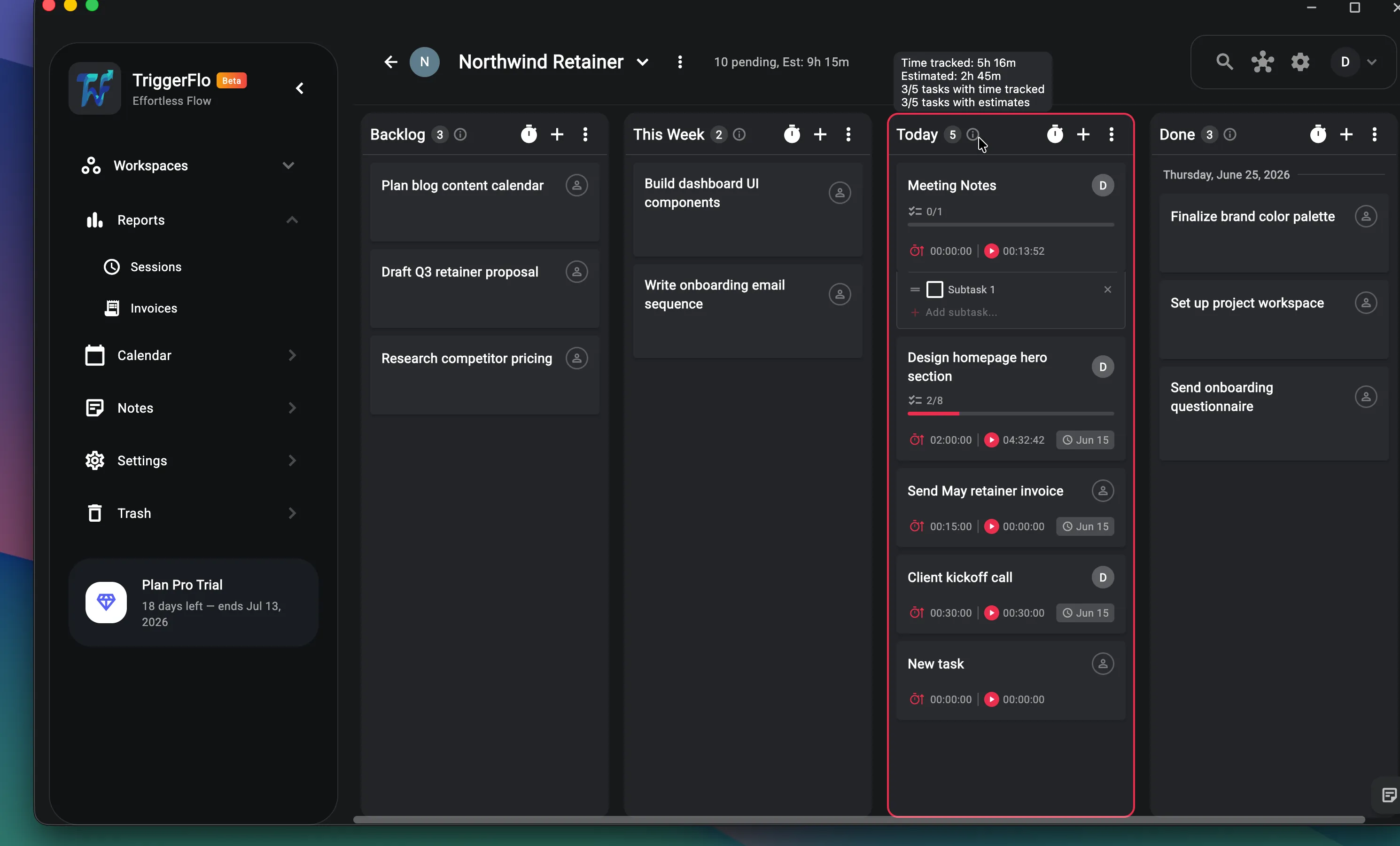
Harvest is built around the client project and the invoice, not around what you are doing today. Planning who works on what is Harvest Forecast — a separate product, a separate $5 per person per month — and seeing planned against tracked means connecting the two. TriggerFlo puts the board in the same window as the timer, so every card already carries its estimate next to its tracked time and the variance is just visible.
Difference 2
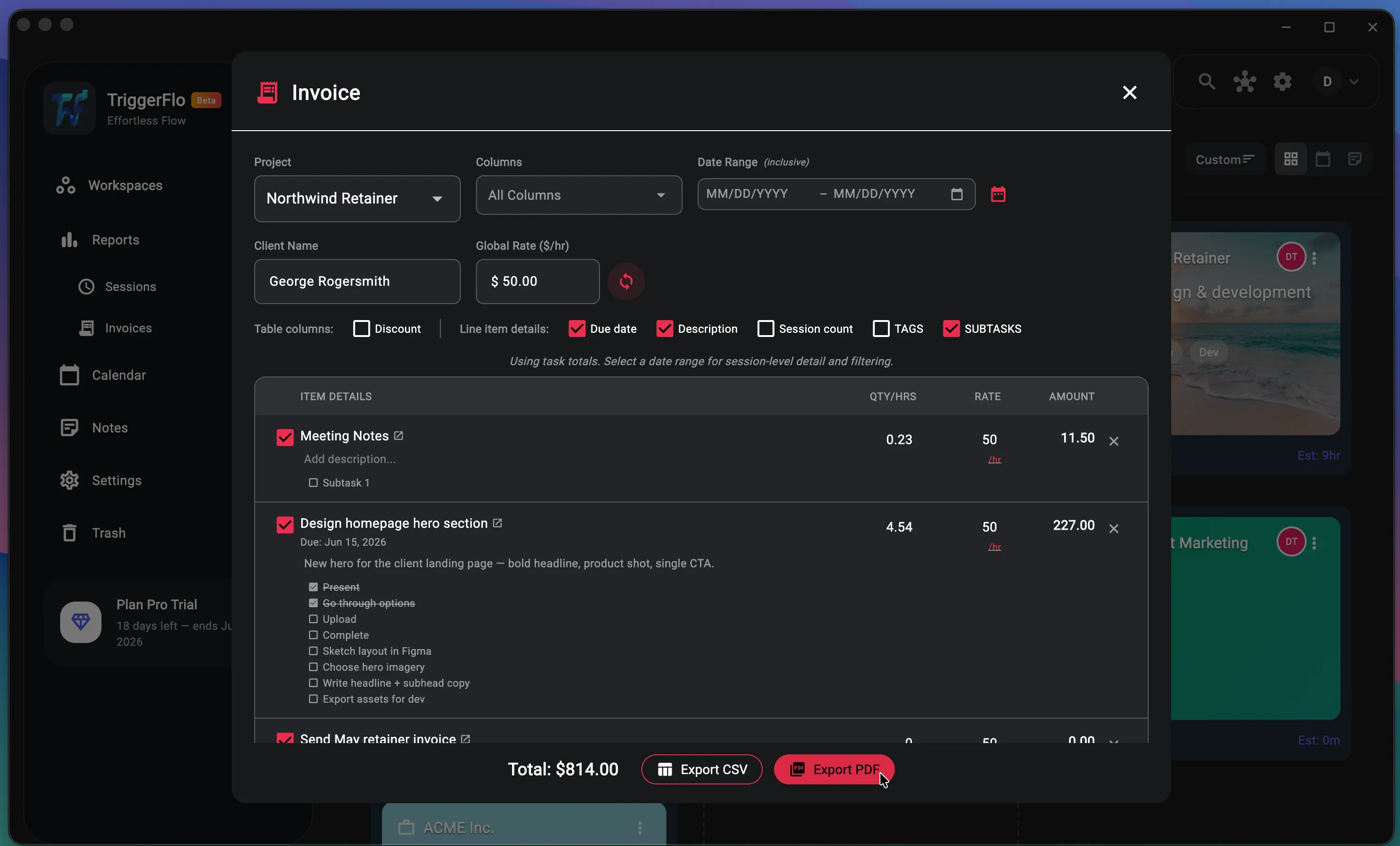
This is the closest fight on the page: invoicing is what Harvest is for, and it does more of it — expenses with receipts, payment and accounting integrations, the whole billing chain. TriggerFlo generates the invoice from the same tracked time sitting on the same cards, included with Pro at a flat price, with no per-invoice usage fee underneath it. If you need the accounting chain, take Harvest. If you need to bill your own hours without a meter running, this is enough.
Harvest is a good product. Here is the honest split — the cases where it is the right call, and the cases where TriggerFlo is.
Billing clients is the job, not a side effect of it
Harvest has spent about two decades on one loop: track hours against a client project, raise the invoice, collect the money, reconcile it in your accounting software. Expenses with receipts, retainers, payment and accounting integrations — that whole chain is the product. TriggerFlo generates invoices from tracked time on Pro, and that is where it stops. If your month ends in a stack of client invoices, Harvest is the more complete answer.
You need expenses and reimbursables alongside the hours
Billable expenses with attached receipts, rolled into the same client invoice as the time, are included even on Harvest’s free plan. TriggerFlo has no expense tracking at all, and putting one in is not on the near roadmap.
Somebody has to approve the timesheets
Timesheet approvals, profitability reporting, an activity log and SAML SSO live on Harvest Enterprise. TriggerFlo has project roles and email invitations; dedicated team plans are still in progress. If an agency finance lead is signing off on hours, Harvest is built for that and TriggerFlo is not.
The board and the timer are the same app
Harvest tracks time. Harvest Forecast schedules it, as a separate product at $5 per person per month, and seeing planned against tracked means connecting the two. In TriggerFlo every card on the board already carries its own estimate and its own tracked time, in one window, on one bill.
A flat price, with no meter running underneath it
Harvest Teams is quoted "starting from" $9 a seat: additional invoices, projects, clients and tasks are billed based on what you use, so the bill moves with how busy you were. TriggerFlo Pro is $5.99 a month, $45.99 a year, or $119 once — unlimited projects, and the number does not change because you had a good quarter.
You can stop renting it
The lifetime license is one payment of $119, updates included. That is about thirteen months of a single Harvest Teams seat, and Harvest has no equivalent — the meter runs for as long as you use it.
Linux, and a watch on your wrist
Harvest ships desktop apps for macOS and Windows, and mobile apps for iPhone and Android. TriggerFlo adds signed Linux builds for x86_64 and ARM64, Raspberry Pi included, plus Apple Watch and Wear OS apps for starting a timer without finding a screen.
For tracking and invoicing your own client work, largely yes — projects, clients, billable rates, reports, invoices and CSV export all have equivalents. Where it is not a drop-in: TriggerFlo has no expense tracking, no timesheet approvals, and a much shorter list of accounting integrations. If your invoices carry reimbursable expenses or sync into an accounting ledger, check those two gaps before you move.
One person on Harvest Teams is $108 a year at the annual rate, before any usage-based extras. TriggerFlo Pro is $45.99 a year, or $119 once for the lifetime license. If you also use Harvest Forecast for scheduling, add $5 per person per month — $168 a year for the pair, against a one-time $119.
Because the seat fee is a base rate. Harvest’s own pricing page says additional invoices, projects, clients and tasks are billed based on what you use. That is a defensible model — a light month costs less — but it means the quoted $9 is a floor rather than a total. TriggerFlo Pro has no usage component.
Export your time entries from Harvest as CSV, then email support@triggerflo.app and we will help you get them in. There is no one-click importer yet.
Yes — native .deb and .tar.gz builds for x86_64 and ARM64, plus the web app. Harvest ships desktop apps for macOS and Windows only.
Harvest pricing and features on this page were checked on September 7, 2026 against Harvest pricing , Harvest apps , Harvest Forecast pricing . Plans change; check their site for today's numbers. Spotted something out of date? Tell us at support@triggerflo.app and we will fix it. TriggerFlo is not affiliated with or endorsed by Harvest.
Free up to 3 projects, no credit card. Run it alongside Harvest for a week and keep whichever one you actually open.
New features and fixes as they ship on desktop and mobile. No spam, unsubscribe any time.