Time tracking without surveillance

A time tracker that does not watch you work

No screenshots. No activity percentage. No GPS trail. No log of the apps you opened. TriggerFlo tracks the time you started against the task you chose, and nothing else — because it is built for the person doing the work.

Free forever up to 3 projects. Pro $45.99/yr, or $119 once. Mac, Windows, Linux, iOS, Android.

What TriggerFlo does not collect

Most time trackers describe what they capture. This is the opposite list — and every line on it is a decision, not a feature we have not got around to.

No screenshots

TriggerFlo never captures your screen, on any interval, on any plan. There is no setting for it because there is no code for it.

No activity percentage

Nothing counts your keystrokes or mouse movements and converts them into a productivity score. Thinking looks like idling to software that measures this, which is most of what is wrong with it.

No GPS or location trail

The mobile apps ask for no location permission. Where you worked is not tracked, stored, or reportable.

No app or URL logging

TriggerFlo does not record which applications you opened or which sites you visited. It knows the task you picked, because you picked it.

No screen recording

No video capture of your session, live or after the fact.

No idle policing

The timer will ask whether to keep idle time when you come back to it. That prompt goes to you, and the answer is not reported to anybody.

What it tracks instead

One timer, one task, started by you

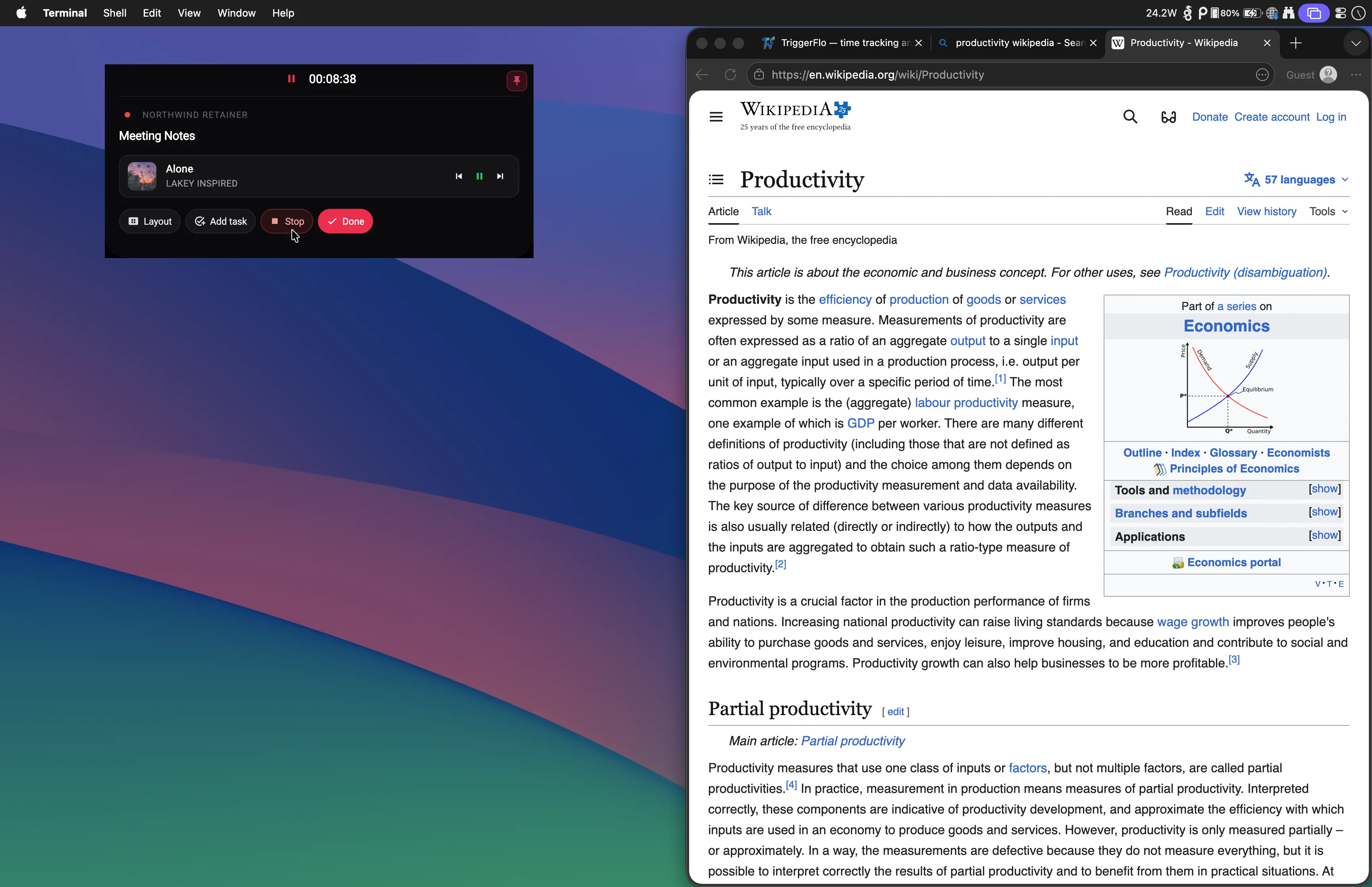
The floating timer sits above whatever you are working in and shows the task you are on. You start it, you stop it, you move it to a different card. That single deliberate act is the whole data model — which is why the reports come out legible and why there is nothing embarrassing in them.

The trade is real and worth stating: a tracker that only knows what you told it can be wrong, because you forgot to start it. TriggerFlo answers that with a timer that is hard to lose behind other windows, not with a process that watches you in case you did.

The TriggerFlo floating timer running above another application, showing the current task and elapsed time.

When you genuinely do want a monitoring tool

Hubstaff and Time Doctor are the two names people usually mean by this, and they are capable products solving a problem TriggerFlo does not solve. Hubstaff describes its offering as app and URL usage, optional screenshots, and activity levels in real time. Time Doctor lists screenshots and online-versus-offline monitoring from its entry plan, with web and app usage reporting above that and video screen recording on its top tier.

There are legitimate reasons to want that. If you bill a client who contractually requires evidence of hours worked, if you are managing a large hourly contractor workforce across time zones, or if a compliance regime obliges you to keep an auditable record of who did what and when, a tracker that only records what somebody chose to tell it is not sufficient. Buy the tool that does the job.

The distinction worth drawing is who the software is bought for. Monitoring tools are purchased by one person to observe another. TriggerFlo is bought by the person who will use it. If that is you — a freelancer, a developer, a small team that trusts each other — the absence of all this is not a missing feature list. It is the point.

Descriptions of Hubstaff and Time Doctor are taken from their own public product and pricing pages, checked on September 7, 2026: Hubstaff employee monitoring, Time Doctor pricing. No prices are quoted here; check their sites for those. Both are described as their makers describe them, and TriggerFlo is not affiliated with either. Spotted something out of date? Tell us at support@triggerflo.app.
Privacy and time tracking — common questions

Can my manager see what I was doing in TriggerFlo?

On a shared project, other members see the tasks and the time logged against them — the same thing you would put on a timesheet. There is no screen capture, no activity score, no app or URL history and no location data, because none of it is collected. There is nothing extra for an administrator to turn on.

Is this just a smaller tool that has not built monitoring yet?

No. Monitoring is not on the roadmap and is not a resourcing question. TriggerFlo is built for the person doing the work rather than the person auditing it, and surveillance features would make it worse at that job.

My client insists on proof of hours. Is TriggerFlo enough?

It depends on what they mean by proof. TriggerFlo produces detailed time reports and invoices broken down by project and task, which satisfies most clients. If your contract specifically requires screenshots or activity levels as evidence, TriggerFlo cannot produce them and a monitoring tool is the honest answer.

What about the team features — do those add tracking?

Project sharing, roles and email invitations let people work on the same board. They do not add any observation of how a person works, only visibility of the tasks and time they logged themselves.

Where does my time data actually live?

Locally on your device, and synced to your account so your phone, watch and desktop agree. You can export all of it as CSV whenever you want, on the free plan included.

Track your own time, for your own reasons

Free up to 3 projects, no credit card, and your data exports to CSV whenever you want it back.

Get release notes in your inbox

New features and fixes as they ship on desktop and mobile. No spam, unsubscribe any time.